
A developer connects an AI coding agent to Jira and Confluence through an MCP server. The agent can read tickets and design documents and even update a work item when permitted. It discovers two conflicting explanations for the same API decision. One page describes the current approach; another captures a proposal rejected months earlier. The connection worked perfectly, yet the agent still has a knowledge problem.
The Model Context Protocol (MCP) standardizes a way for AI clients to discover and use tools and other server capabilities. It does not, by itself, decide which organizational statement is approved, which historical exception remains valid, or whose judgment can promote a suggestion into team policy. Understanding the boundary helps teams benefit from MCP without expecting it to solve an unrelated governance problem.
What MCP already does well
An MCP server exposes tools and resources through a common interface. A connected client can query an issue tracker, retrieve a design page, or use a repository tool without each agent application inventing a new integration format. Implementations can use authorization and scoped access so a user or agent sees only what its connection permits. That is meaningful progress: fewer custom connectors and more useful work done through familiar systems.
Consider an agent asked to implement a new invoice export. Through MCP it retrieves the Jira ticket, a Confluence architecture page and the repository’s API tests. All are real artifacts, and each contributes evidence. The task still requires interpretation: Is the architecture page current? Did product approve a CSV export for this customer segment? Does a security policy restrict personal data fields? A tool response is not automatically a vetted instruction.
Where “access” stops and “authority” starts
The failure mode appears when an agent treats the last or most relevant search result as the official decision. A Confluence page may accurately summarize an early proposal, while a later review reversed it. Or the user may have permission to read a draft that is not authorized for production. MCP authentication can establish who may access the source; it does not establish what the source is allowed to decide.
A reliable workflow therefore needs two independent checks. First, use the tools under the correct actor identity and permissions. Second, evaluate the retrieved knowledge for scope, status, evidence, ownership and freshness. The distinction is particularly important when multiple organizations, teams or environments share one agent client.
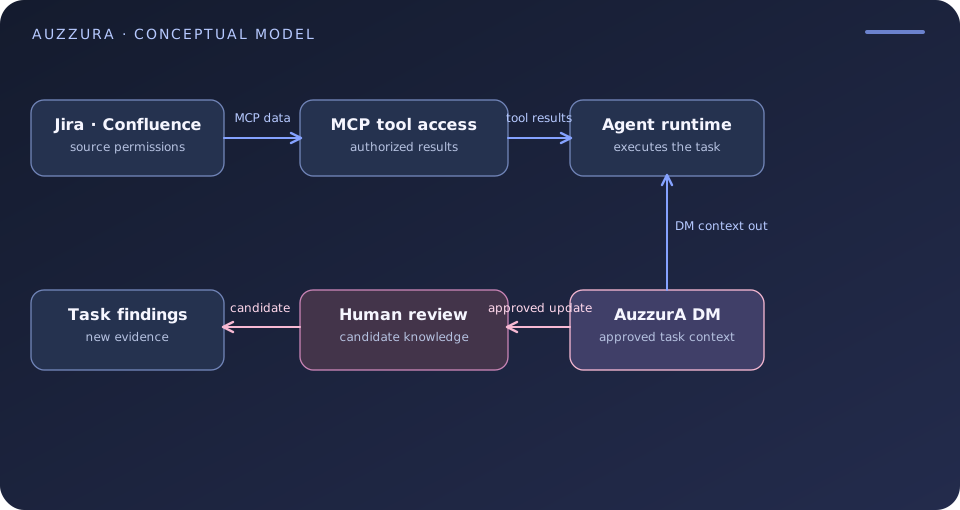
A practical agent workflow
The agent starts with the invoice-export task. It retrieves candidate source material through MCP. It then asks a separate question: Which constraints govern this implementation? For example, an approved decision might say “No direct exports of personal fields from the billing service in production.” That rule can be supplied as task context alongside a link to its security review. The agent can design a compliant export or return a question if no approved path exists.
After work, the agent may identify a missing exception and propose a change. The policy owner reviews the proposal before it becomes shared, trusted guidance. This loop is not a new authority bestowed by MCP; it is an organizational process layered on top of access and execution.
Where AuzzurA DM fits
DM is intended to be that reviewed context companion. It captures and maintains Decisions, Rules and Skills as scoped records, links them to evidence and lets people review candidate updates. Search, Ask DM and Prepare Context help a person or connected agent retrieve the currently applicable knowledge for a task. DM also offers an MCP-facing interface for supported clients, so agents can request context rather than relying only on pasted prompts or source search results.
The division of labor is straightforward. An Atlassian MCP server can expose an authorized Jira page; DM can preserve the reviewed policy and rationale that determine how the page should be interpreted. The agent runtime still decides which tools to call and performs the work under its own permissions. DM is not a universal tool-execution guard or an automatic approval engine.
Evaluate the missing piece before adding software
Take one MCP-enabled workflow and identify a choice that has changed over time. Can the agent distinguish an approved current decision from the superseded proposal using only your existing system? If it can, document how. If not, add reviewed decision records and applicability checks before adding more connectors. Tool access is the entrance to context, not the whole context-management strategy.
Sources
Put shared context to work.
DM is AuzzurA’s Beta product for human + AI teams. Sign up or sign in through the DM portal.